Content production runs as an agent pipeline. I approve the output
I built two agent-native content engines at ThinkingAI: a social-calendar engine and a newsletter engine. Multi-workflow, multi-LLM pipelines carry each piece from plan to a roughly 90%-ready deliverable in Slack or Lark. My job at that point: approve, or nudge. That 90% is my own estimate. I have never measured it.
The person these engines were built for left in my first month
Our senior content manager owned the content, ran social and the newsletter. The CMS I had just rebuilt was built for them: the point was to raise one person's output and keep them in the seat that matters, making the calls and doing the final edit, so our content still sounded like us. Then they resigned, about a month after I started.
Social and the newsletter cannot go quiet while a role is open. Freelance writers had drafted alongside the content manager, who edited and approved, and since the resignation it runs on me and the workflows. So the automation I had designed to amplify a person had to become the thing that carried the function, and I built two multi-agent production workflows to do it. The workflows now hold the same jobs that used to be slow.
- Design meant a designer's template, then hand-editing. Every branded post was a person filling in a layout someone else had built. So layout plus copy needed a tool and a headcount.
- Curation meant a human reading everything. A newsletter issue started with someone trawling Twitter, RSS, and other newsletters, then picking, summarizing, and formatting by hand.
- Approval meant ping-pong. Drafts bounced between producer, reviewer, and approver over days before anything shipped.
Two engines: social calendar and newsletter
Both run the same shape. Cheap models filter and draft, stronger models reason, and an internal agent team reviews before I see a near-final piece.
Five sources into a three-month calendar
I build the content-pillar plan from five sources: agent knowledge, our existing product content, Ahrefs keyword research, the product-update pipeline, and real-time topics linked to the newsletter. That distills into six pillars, 24 posts, and a three-month calendar.
The calendar then goes plan → execution, all packaged inside the engineA master workflow per content type
The engine is a master workflow per content type: whitepaper, ebook, blog, product update, and more. That is six to seven types on the content engine; the LinkedIn calendar runs its own eight. Each type runs asset workflows for the visuals, a caption workflow for the copy, and a review team that checks both. One workflow picks the topic, writes the caption and makes the image.
The image side is where the design dependency went. The workflow generates the base stock photo through nano banana and the image tools, then lays the branding on as an HTML overlay: roughly 20 post templates, some a single clean layer, some a much more composed treatment. Most of those layouts started as good Canva templates I collected in advance, rebuilt against our color palette and brand rules so the logo, the type and the framing land where they are supposed to. The workflow picks the template that fits the subject, generates the image for it, composites the overlay, and hands the finished asset to scheduling.
Each design is an LLM text-to-image step plus an HTML overlay, driven by branding-guideline system prompts. That is the template now; there is no designer hand-off.The review panel, then one human gate
Before a human sees anything, agents review it: AI-voice checks, plus reviewers standing in product-marketing, audience, and ICP shoes, and the panel itself is tuned per content type. By the time the deliverable lands in Slack and Lark, it is ~90% ready.
I approve or send it back, occasionally my manager instead; I am still wiring publishing into a third-party unified social-publishing API, and every publish today is a human stepHarvest to HubSpot-ready, cost-tiered
A harvest line pulls updates from 35+ sources across Twitter, RSS, and other newsletters, and each model in the chain does the job it is priced for. DeepSeek picks topics and cleans the raw RSS at volume. Kimi K3 then works category by category, shortlisting what is worth someone's attention in each. Claude Code makes the final call on what goes in the issue, and K3 drafts from that decision: the thought-leadership beat plus the news for each category we cover, which are agentic AI, analytics, gaming and mobile app.
A separate agent gathers the internal side in parallel: our own blog pieces, upcoming events, and product updates from the CMS pipeline. Everything lands back with K3, which assembles the issue as modular, HubSpot-compatible HTML. In HubSpot I drop in a column, paste, and it is ready to send. A content-review workflow has already checked every section by then.
Output is copy-paste-ready HTML for HubSpot plus a preview; approvals route from operator to manager, partly wired, and publishing stays a human stepA weighted rotation, so the queue never runs dry
Eight content types feed the LinkedIn calendar, and every one of them keeps a separate inventory behind its own agent. A weighted rotation draws from them: roughly 35% education and POV as the evergreen backbone, 25% thought leadership repurposed from the blog plan, 20% feature and product posts, and the rest data cards, polls and commentary. Triggered types take a slot when fresh output lands; the evergreen backbone fills the gaps. Four to five posts a week, and no two weeks look the same.
Only approved posts enter the queue; every one previews as it will read in the feed before I approve it750 items in, five to eight out, two human gates
Each week a deterministic script harvests roughly 750 items and tags the ~280 with links that actually open. Three sector agents cluster and select 20 to 30 by reading titles and summaries. The script then fetches every selected URL, confirms it opens, and extracts the full article text. The editor agent worth-scores that full text and picks the final five to eight. The newsletter carries a second gate the other engine does not: I edit the run-sheet and choose the POV before anything is written, then writers and an assembler produce the issue, and I review and send. Item URLs pass through the pipeline verbatim from the source list, which leaves the model no opening to invent a link.
The finishing pass includes an AI-tell cleaner that kills em dashes and stock AI phrasing before anything reaches meWhat comes out of the engines
Five posts from the approved LinkedIn queue, exactly as they will run, plus Issue 001 of the newsletter rendered from the real template. Agent-made product videos and templated cards, captions clean, the product link riding in the first comment.
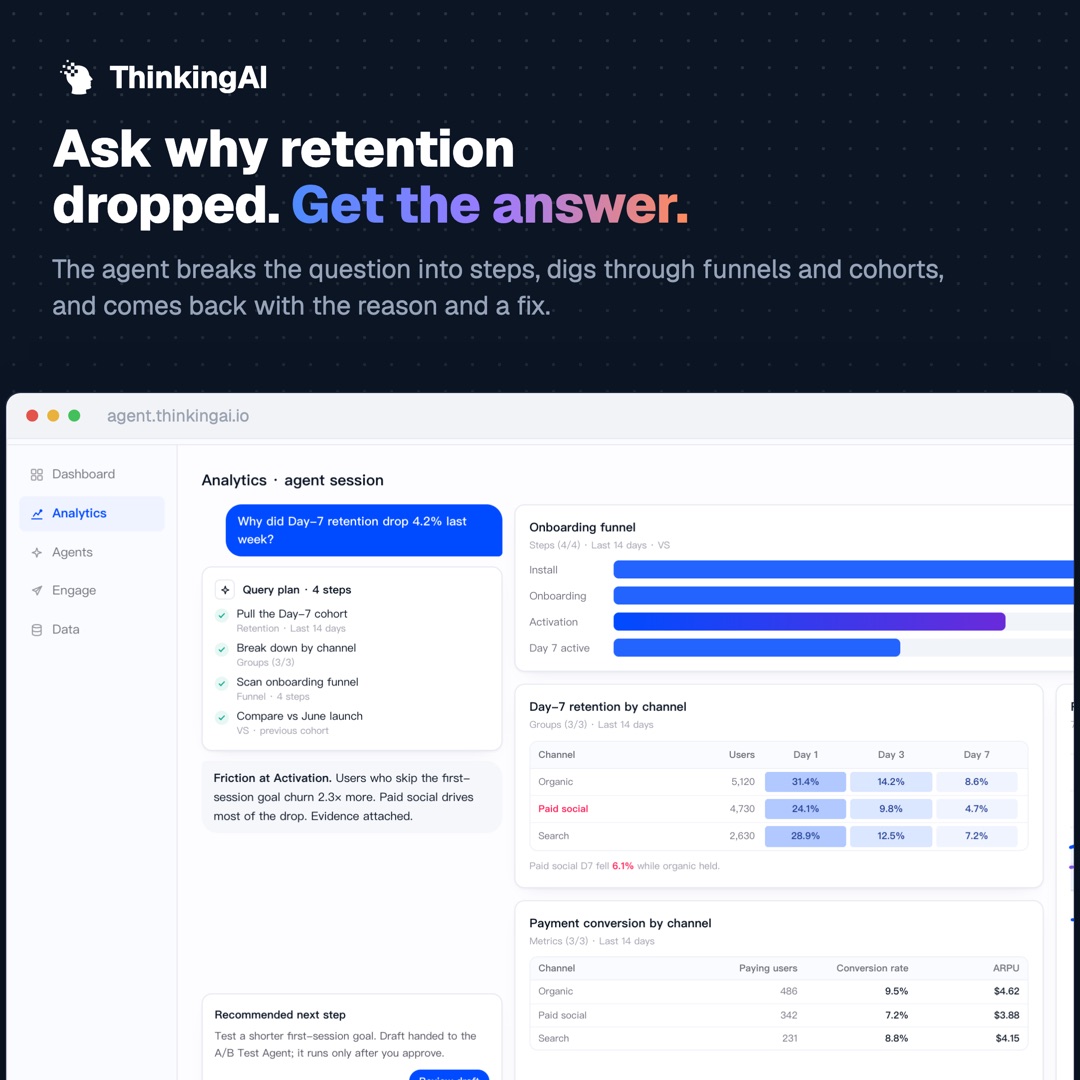
“Why did Day-7 retention drop 4.2%?” Your dashboard shows you the drop. It almost never tells you why.
So you go hunting. And the answer is usually hiding in one cohort or one broken step that a top-line chart will never surface on its own.
Ask ThinkingAI the same question in plain English. The agent does the digging through your funnels and cohorts, finds where users fell off, and drafts a likely cause with a fix worth testing.
You read the evidence and decide whether to ship it.
Every dashboard you trust is downstream of your tracking. And tracking quietly rots: a rename here, a missed property there, and a report is wrong for weeks before anyone notices.
The Data Collection Agent instruments and validates your events against your tracking plan, and catches breaks before they reach a report.
Your team stays in charge of the plan. The agent does the grunt work of keeping it honest.
One POV per issue, one judgment per item
Every issue is built around a single point of view that I pick at the run-sheet stage. Issue 001's was “agent security is an observability problem,” and the lead essay, the pull quote, and the closing blog pick all argue it. The essay is a 120 to 220 word beat written in the house voice, reacting to one hook from that week's harvest.
Each news item is a linked headline plus a one-or-two-line house take. The rule for the take: add a judgment the source itself did not make. A survey becomes “an even split is a distribution, and the average is hiding it.” A benchmark becomes “the reusable part is the method, and the winner will change.”
The layout is locked and Outlook-safe: 600px table layout, inline CSS, a VML roundrect so the button stays rounded in Outlook, and a visible Read-more link on every item because hover states do not exist there. The assembler outputs this exact HTML, paste-ready for HubSpot, and I send it after the final read.
Serif for the essay, sans for the news, one accent color, and the real logo on white: the template is a written spec every issue inheritsWhere it stands
The newsletter engine runs, the social system is built and in use, and I am building the orchestration layer on top now.
What changed
Social supply: ~2–3 posts a week before, about five scheduled now, across more lanes. The newsletter ships weekly and opens at about 22%. Its list grew from zero to 1,000+, all from the site signup.
Where it stops
Choosing posts is still my call. The engines do not publish through the third-party API or improve themselves yet. I kept the approval gate on purpose. A human fires every publish.
Scope
Social and newsletter sit outside my core job. These engines exist to demonstrate the operating model: the same capstone pattern, applied to content.
Related work
From two or three posts a week to a calendar that stays full
The channel used to run at two to three posts a week, and it ran on whatever someone had time to make. It now sits at about five scheduled posts a week, with unscheduled ones on top, and the coverage widened at the same time: product capability, brand story, blog, thought leadership, events and webinars all have a lane.
Its list started at zero and is now past a thousand, almost all of it from the signup on the site. That number measures the site and the signup. Whether an issue was worth opening shows up in opens and unsubscribes, and those are the numbers I am still building a read on.
The other engines became the ammunition. Once the ebook, blog and product-update workflows were producing on their own, the social calendar had something real to draw from every week. Product-related posts needed motion, a capability we did not have before. I pointed the video pipeline at it, reusing the same reference-frame technique and the Remotion and HyperFrame rendering path, so a product capability ships as a short video the same week.
The last piece is spreading it inside the company. A published post lands in an internal launchpad where anyone can repost it or drop a prepared comment, copy and paste, no drafting required.
Coverage now: product capability · brand story · blog · thought leadership · events · webinars, plus unscheduled posts DeepSeek
 Kimi K3
 ChatGPT
 Claude
 Gemini image
 Ahrefs
 HubSpot
Calls I made
Each design is HTML plus an LLM image, driven by branding-guideline system prompts. Text and buttons composite as an overlay. The recipe is the template, so a new post type needs a prompt, and no designer.
DeepSeek filters cheap, ChatGPT and Kimi K3 do the reasoning, Claude closes as final reviewer. Model strength maps to task difficulty, and the bill maps to it too.
A caption workflow runs while the image renders, so both arrive together. Nobody writes copy for a finished visual after the fact.
A whitepaper and a LinkedIn post deserve different critics. Each content type gets its own review team, on top of shared AI-voice checks and product-marketing / audience / ICP lenses.
The machinery produces; the person approves or nudges from Slack or Lark. That single gate replaced days of draft ping-pong.
I picked a function nobody asked me to take on, and ran content ops on it as an agent pipeline.
Always open to new workflows or how to improve existing ones, he brings a collaborative and enthusiastic approach to operational initiatives.
 Christine M. PorrettaSenior Manager, Intl. Marketing
Want a content pipeline your team can still put its name on?
The CMS these engines draw from, and where to find me.